AWS Cost Optimization: A Practical Guide to Cutting Cloud Spend Without Cutting Capabilities
The Cloud Cost Problem
Cloud computing promised to reduce IT costs. For many enterprises, the opposite has happened. Without disciplined cost management, AWS bills grow 20-30% year-over-year, often faster than business revenue. The root cause is not AWS pricing — it is how organizations consume cloud resources.
The good news: most enterprises can reduce their AWS spend by 30-40% without sacrificing performance. Here is how.
The Cost Optimization Framework
We organize cost optimization into four layers, ordered by impact and ease of implementation:
Layer 1: Visibility (Week 1-2)
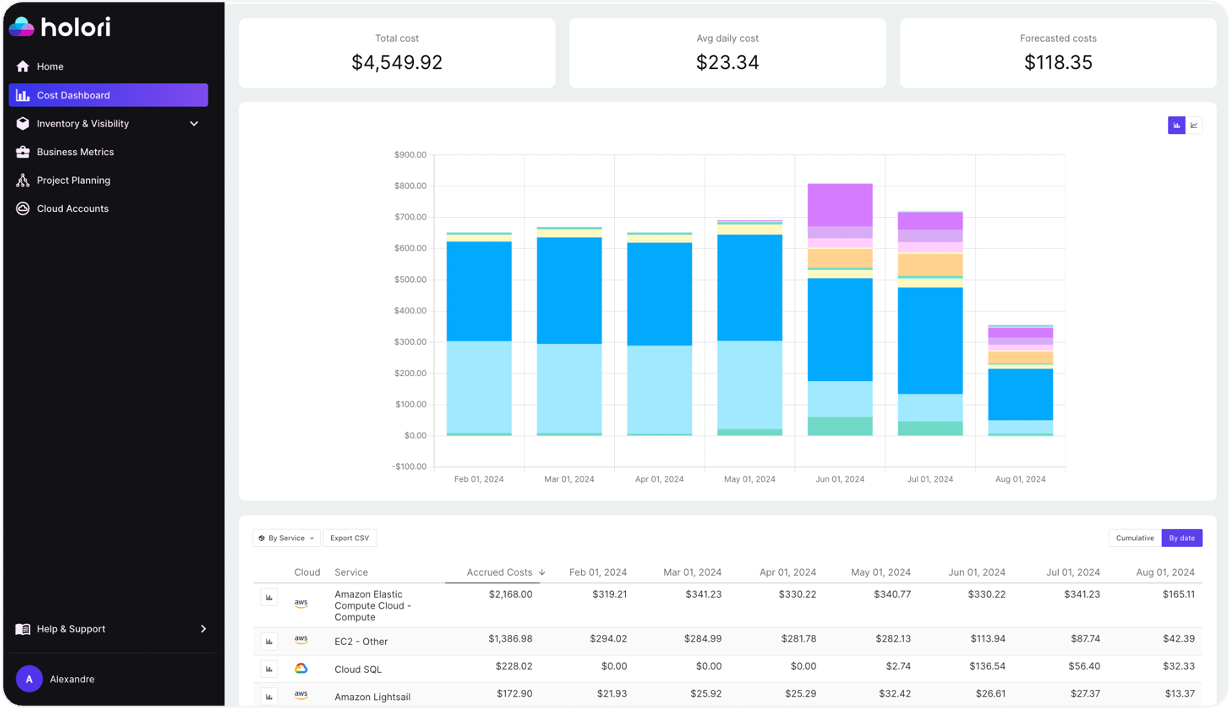
You cannot optimize what you cannot see. Start with cost visibility:
- AWS Cost Explorer — Enable and configure granular cost tracking by service, account, region, and tag.
- Cost allocation tags — Implement a mandatory tagging strategy: environment, team, project, cost-center. Untagged resources should trigger alerts.
- AWS Budgets — Set budgets per account, team, and project. Configure alerts at 50%, 80%, and 100% thresholds.
- Third-party tools — CloudHealth, Spot.io, or Vantage for advanced analytics and multi-cloud visibility.
Layer 2: Right-Sizing (Week 2-4)
Right-sizing is the single highest-impact optimization. Most EC2 instances are oversized:
- AWS Compute Optimizer — Analyzes CPU, memory, and network utilization to recommend optimal instance types. Typically identifies 30-50% of instances as oversized.
- RDS right-sizing — Database instances are frequently over-provisioned. Analyze actual CPU and memory usage over 30 days before downsizing.
- EBS volume optimization — Switch from gp2 to gp3 (20% cheaper, better performance). Delete unattached volumes and old snapshots.
- Graviton migration — ARM-based Graviton instances (C7g, M7g, R7g) deliver 20-40% better price-performance than Intel equivalents for most workloads.
Layer 3: Purchasing Strategy (Month 2-3)
Once workloads are right-sized, optimize purchasing:
- Savings Plans — Commit to a consistent amount of compute usage (measured in $/hour) for 1 or 3 years. Savings of 30-50% vs. on-demand. More flexible than Reserved Instances.
- Reserved Instances — For stable, predictable workloads (databases, core services). 40-60% savings for 1-year commitments.
- Spot Instances — For fault-tolerant workloads (batch processing, CI/CD, dev/test environments). Savings of 60-90%. Use Spot Fleet for automatic capacity management.
- Coverage target — Aim for 70-80% of baseline compute covered by Savings Plans/RIs, remainder on-demand or Spot.
Layer 4: Architecture Optimization (Ongoing)
The deepest savings come from architectural changes:
- Serverless migration — Move event-driven workloads to Lambda. Zero cost when idle, automatic scaling.
- Container optimization — Use Fargate Spot for non-critical ECS tasks. Implement Karpenter for EKS to optimize node provisioning.
- Data transfer optimization — Data transfer costs are often the hidden surprise. Use VPC endpoints, CloudFront, and regional placement to minimize cross-region and internet egress charges.
- Storage tiering — Implement S3 lifecycle policies: Standard → Infrequent Access → Glacier. Automate based on access patterns.
- Database optimization — Aurora Serverless v2 for variable workloads. DynamoDB on-demand for unpredictable traffic. ElastiCache for reducing database load.
Quick Wins Checklist
Implement these immediately for fast savings:
- Delete unused Elastic IPs, unattached EBS volumes, and old snapshots.
- Stop or terminate idle EC2 instances (dev/test environments running 24/7).
- Enable S3 Intelligent-Tiering for buckets with unpredictable access patterns.
- Switch all gp2 EBS volumes to gp3.
- Review and delete unused NAT Gateways ($32/month each + data processing).
- Consolidate underutilized accounts and remove unnecessary services.
- Enable AWS Trusted Advisor cost optimization checks.
Building a FinOps Culture
Sustainable cost optimization requires organizational change:
- Cost ownership — Engineering teams own their cloud costs, not just finance or ops.
- Cost reviews — Weekly cost review meetings with engineering leads.
- Cost-aware architecture — Include cost estimates in architecture decision records.
- Showback/chargeback — Allocate costs to business units to create accountability.
- Automation — Scheduled scaling, automatic cleanup scripts, policy-driven enforcement.
Common Mistakes
- Buying RIs before right-sizing — You lock in savings on oversized instances. Always right-size first.
- Ignoring data transfer — Data transfer can represent 10-15% of total AWS spend. Architect to minimize cross-region and internet egress.
- One-time optimization — Cost optimization is not a project, it is a practice. Without continuous monitoring, costs creep back within 6 months.
- Cutting without understanding — Blindly downsizing without performance testing causes outages. Always validate changes in staging first.
Conclusion
AWS cost optimization is not about spending less — it is about spending smart. The goal is maximum business value per dollar of cloud spend. Organizations that embed cost awareness into their engineering culture consistently outperform those that treat it as a periodic cleanup exercise.